Do this back at the depot, at the end of the route.
-
Read the odometer. Type it in Odometer back at the depot (km).
-
Tap the cyan Save button.
-
Tap the white Trip report (fill, km, damage) button.
-
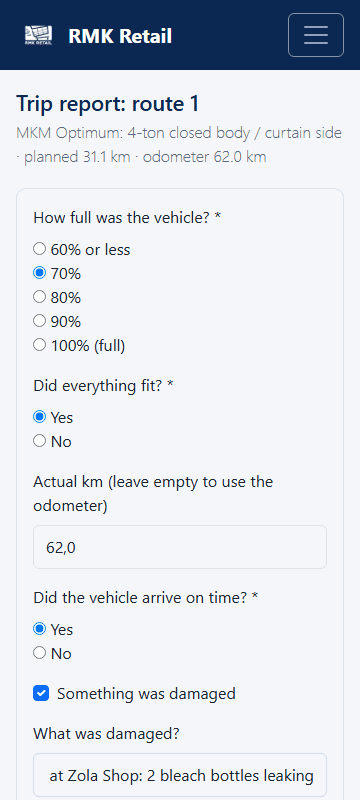
Fill in how full the van was, if everything fitted, and if the transport was on time.
-
If anything was damaged, tick it and say what, for example "2 bleach bottles leaking".
-
Tap the cyan Save the trip report button.
-
Hand in any cash you collected.
What you will see
You see "Odometer saved." The route is closed when every stop is Delivered and the end odometer is saved. Once a month RMK may ask you Would you recommend RMK? Choose a number from 0 to 10.
If something goes wrong
- "A report was already saved". Saving again replaces the old report. That is fine.
- The odometer number is very big. That is fine. Type the full number.
- You forgot the trip report. Do it as soon as you can, or call RMK.
Ask for help
WhatsApp 064 654 1357 · phone 015 296 4695 · e-mail connect@rmkretail.co.za · Monday to Friday 08:00–17:00, Saturday and Sunday 08:00–14:00.