Do this for customers without a smartphone, or who want your help.
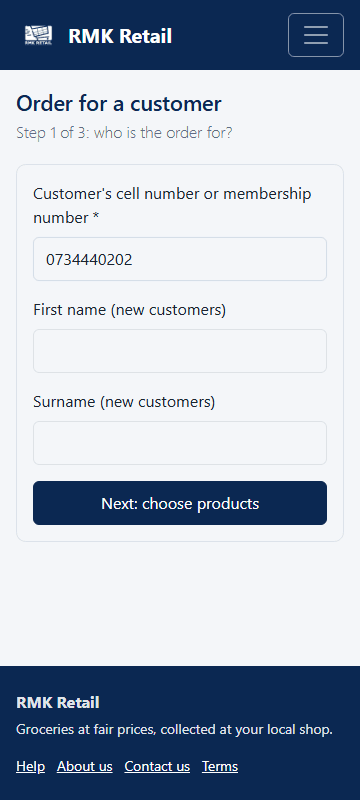
- Tap Order for a customer in the menu.
-
Type the customer's cell number or membership number. For a new customer, also type their first name and surname.
-
Tap the cyan Next: choose products button.
-
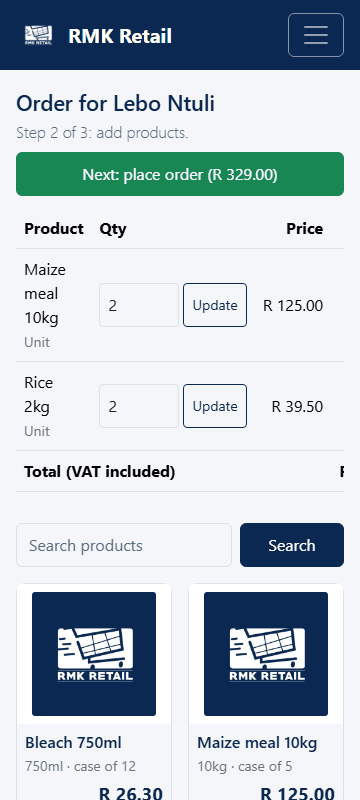
Search for a product and tap Add. Do this for each product.
-
Tap the cyan Next: place order button.
-
Choose the shop under Collect at, and how the customer will pay.
-
Tap the cyan Place order button.
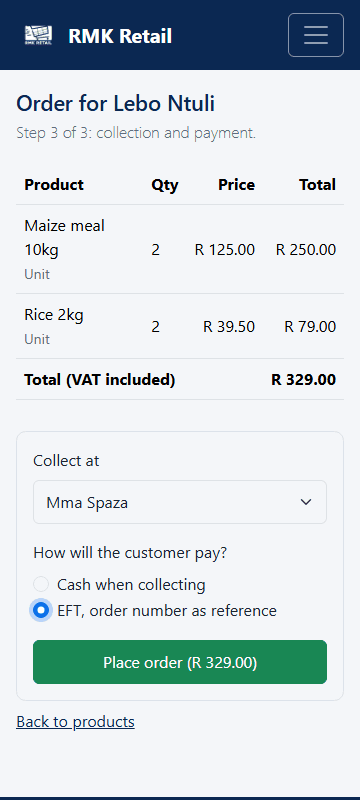
- Give the customer the order number and the collection PIN. They need both to collect.
What you will see
The page shows the order number. The shop accepts the order within 24 business hours. For EFT, the customer pays only after the shop accepts, with the order number as the reference. RMK tells them when to pay.
If something goes wrong
- The customer cannot be found. Type the full cell number (082…), or use their membership number. A new customer needs a first name and surname too.
- Cash is not offered or is refused. Cash works only at a shop that takes cash orders. Choose EFT or another shop.
- The shop says no, or an item is short. The customer chooses another shop, another way to pay, or cancels. For a short item they wait, remove it or take another product. Help a customer without a smartphone answer within 24 hours, or the item is removed.
Ask for help
WhatsApp 064 654 1357 · phone 015 296 4695 · e-mail connect@rmkretail.co.za · Monday to Friday 08:00–17:00, Saturday and Sunday 08:00–14:00.