Do this when you meet people who may want to buy from the shop.
-
Tap Rep home in the menu.
-
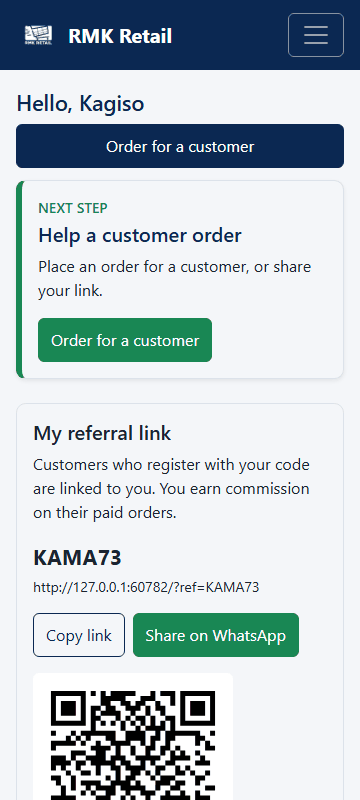
Tap Code and QR card. You see My referral link with your code and QR code.
-
Tap the cyan Share on WhatsApp button to send your link to a person or a group.
-
Or tap the white Copy link button and paste the link in a message.
What you will see
People who sign up with your code, link or QR code are linked to you. Your shop becomes their usual shop.
If something goes wrong
- The person signed up without your code. See "Sign up a customer" below: they can still type your code at checkout.
- The QR code does not open. Ask the person to open their phone camera and hold it still over the code.
- WhatsApp does not open. Tap Copy link and paste the link in WhatsApp yourself.
Ask for help
WhatsApp 064 654 1357 · phone 015 296 4695 · e-mail connect@rmkretail.co.za · Monday to Friday 08:00–17:00, Saturday and Sunday 08:00–14:00.