Do this once, when you start as a sales rep.
- Tap Sales reps in the menu at the top, then tap the cyan Apply now button.
-
If you are asked who you are, tap I am a sales rep, then tap the cyan Continue button.
-
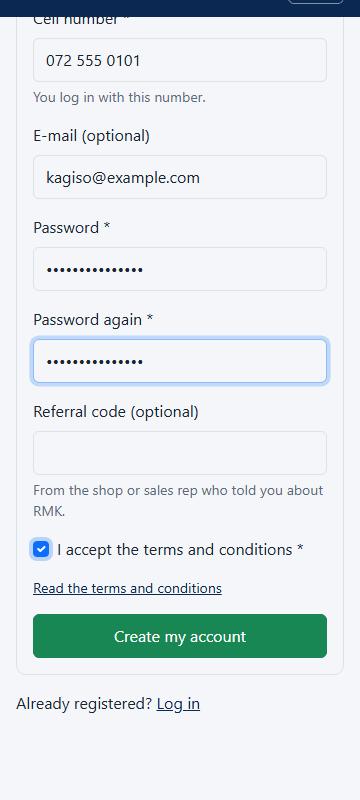
Type your name, your cell number and a password two times.
-
Tick I accept the terms and conditions and tap the cyan Create my account button.
-
On the Join as a sales rep page, fill in where you live and your highest school or study level.
-
Under Retailer's referral code (optional), type the code of your shop.
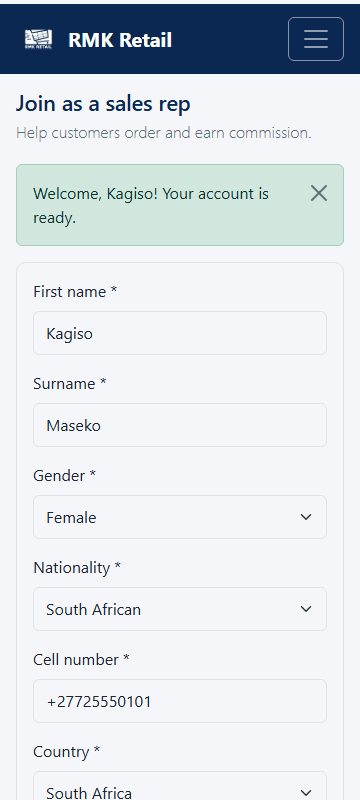
- Tap the cyan Join button.
What you will see
The page says RMK will approve your account soon. The shop owner is told that you linked to their shop. Log in with your cell number and password.
If something goes wrong
- "Waiting for approval" on Rep home. RMK has not approved you yet. Ask RMK if it takes more than a few days.
- "This is not a shop referral code". You typed a sales rep's code or a wrong code. Ask the shop owner for the code on their Shop home.
- You want your commission on WhatsApp. Tap Account, then WhatsApp PIN, type a PIN and tap Save PIN.
Ask for help
WhatsApp 064 654 1357 · phone 015 296 4695 · e-mail connect@rmkretail.co.za · Monday to Friday 08:00–17:00, Saturday and Sunday 08:00–14:00.