Do this once, when you start. RMK invites wholesalers it already works with. A new wholesaler can apply online.
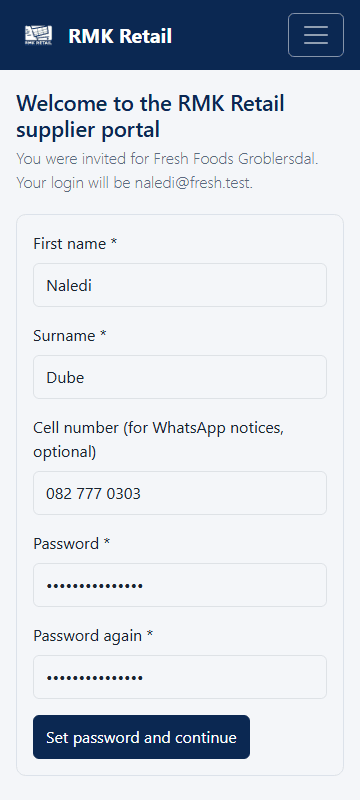
- Open the e-mail from RMK and tap the link in it.
-
Check that the page shows your company's name.
-
Type your first name, last name, cell number and a password. Type the password again.
-
Tap the cyan Set password and continue button.
-
No invitation? On the Sign in page, tap Register.
-
Tap I am a wholesaler or transporter, then tap the cyan Continue button.
-
Fill in the three steps of Apply to supply: Your business, Your details and Documents. Photos of your papers taken with your phone are fine.
-
Tap the cyan Send my application button.
What you will see
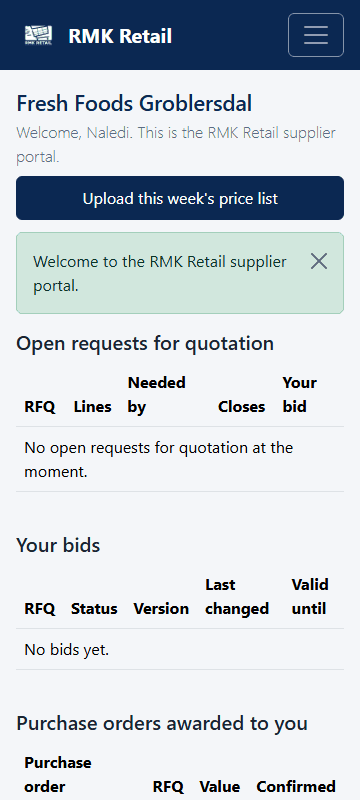
After the invitation, you see Supplier home. After you apply, My partner application shows how far RMK is with your application. When RMK approves you, you get a message each time a tender opens in your area.
If something goes wrong
- "This invitation can no longer be used". The link works only once and only for 7 days. If you already set a password, sign in. If not, ask RMK for a new invitation.
- The page shows the wrong company name. Do not go on. Call RMK.
- You are not sure which papers to send. Send what you have. RMK will tell you what is missing.
Ask for help
WhatsApp 064 654 1357 · phone 015 296 4695 · e-mail connect@rmkretail.co.za · Monday to Friday 08:00–17:00, Saturday and Sunday 08:00–14:00.