Do this every week, so RMK has your new prices.
-
Tap Prices in the bottom bar (or My price lists in the menu).
-
Tap the white Download my price template (Excel) button. The file has your products and your last prices.
-
Open the file. In the yellow columns, type your prices without VAT. RMK adds the VAT for each product.
-
Fill in units per case, the case price and in stock (Y or N). For a special, type the promotion price and its end date.
-
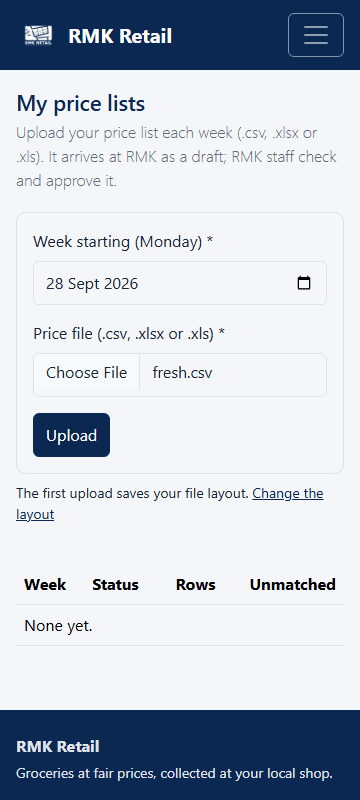
Save the file. Back on My price lists, choose Week starting (Monday).
-
Under Price file (.csv, .xlsx or .xls), choose your saved file.
-
Tap the cyan Upload button.
What you will see
Your list arrives at RMK as a Draft. RMK staff check it and approve it. Then it shows Approved. Staff look closely at prices that changed by more than 15%, lines RMK could not match, and products you left out. A promotion price shows as a special until its end date.
If something goes wrong
- You want to send your own file, not the template. That is fine. Tap Change the layout once and type the names of your columns. Tick "prices include VAT" if your prices include VAT. Tap the cyan Save layout button. RMK reads your file the same way every week.
- RMK read the wrong columns. Tap Change the layout, fix the column names, and upload again.
- Some lines say "Unmatched". See "Suggest a match" below.
Ask for help
WhatsApp 064 654 1357 · phone 015 296 4695 · e-mail connect@rmkretail.co.za · Monday to Friday 08:00–17:00, Saturday and Sunday 08:00–14:00.