Sometimes the supplier brings less than RMK ordered. You get a message, and your order page says An item is short.
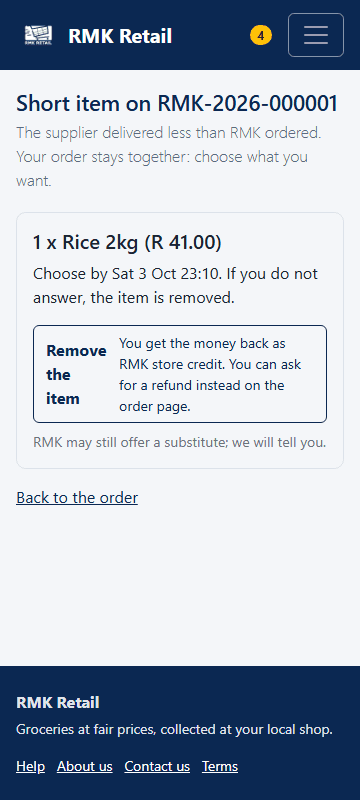
- Open the order and tap Choose now.
-
Tap Remove the item to pay less, or tap Take … instead to get another product.
-
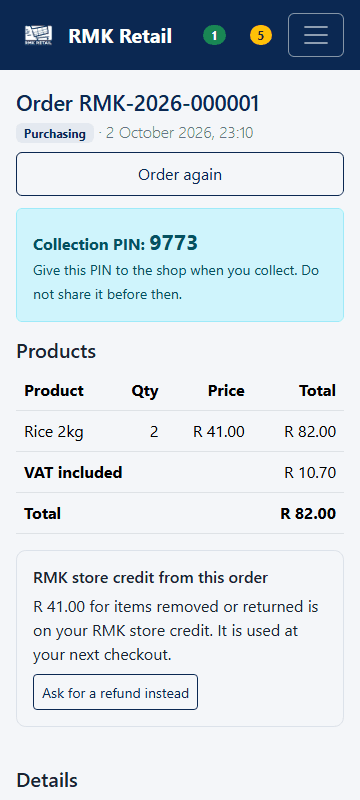
If you want money back instead of store credit, open the order and tap the white Ask for a refund instead button.
What you will see
If you already paid, the money for a removed item goes to your RMK store credit. It is used at your next checkout. A refund goes back the way you paid; the order page then says Refunded.
If something goes wrong
- You did not choose in 24 hours The item is removed.
- The other product costs more The page says so. Choose it only if you agree to pay more.
- There is no "Wait for the next delivery" You can wait only once RMK packs orders at its own place. Until then, remove the item or take the other product.
Ask for help
WhatsApp 064 654 1357 · phone 015 296 4695 · e-mail connect@rmkretail.co.za · Monday to Friday 08:00–17:00, Saturday and Sunday 08:00–14:00.