Do this at each shop on your route.
-
On the route page, tap the cyan Deliver button next to the shop.
-
Scan each crate for this shop as you hand it over.
-
When all the crates are off, give your phone to the shop owner.
-
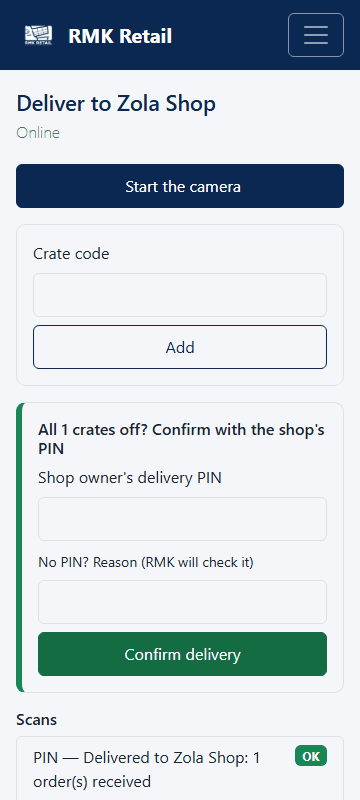
The owner types their PIN in Shop owner's delivery PIN.
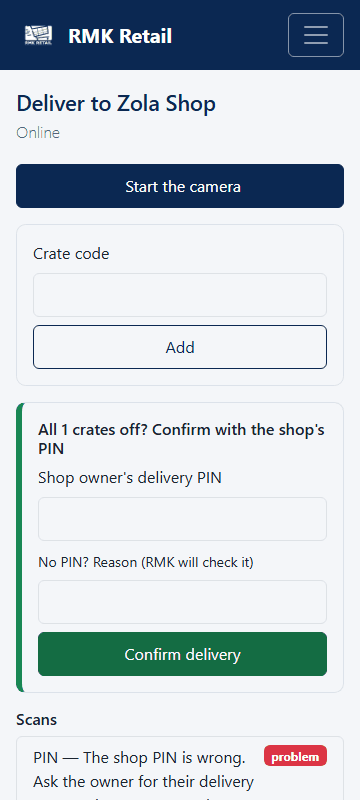
- Tap the cyan Confirm delivery button.
- If the route shows Returns to bring back, scan the shop's return label too. Take those goods back to RMK.
What you will see
The stop shows Delivered. The customers are told their orders are ready for collection. For a return, you see "Return … collected". The shop may rate the delivery on its own phone: How was this delivery? from 1 to 5, for being on time, complete and in good condition.
If something goes wrong
- "The shop PIN is wrong". Ask the owner to type it again.
- The owner forgot the PIN or is not there. Type why in No PIN? Reason (RMK will check it) and confirm. Then call RMK.
- No signal at the shop. Keep scanning. The PIN is checked when the phone is back online.
Ask for help
WhatsApp 064 654 1357 · phone 015 296 4695 · e-mail connect@rmkretail.co.za · Monday to Friday 08:00–17:00, Saturday and Sunday 08:00–14:00.