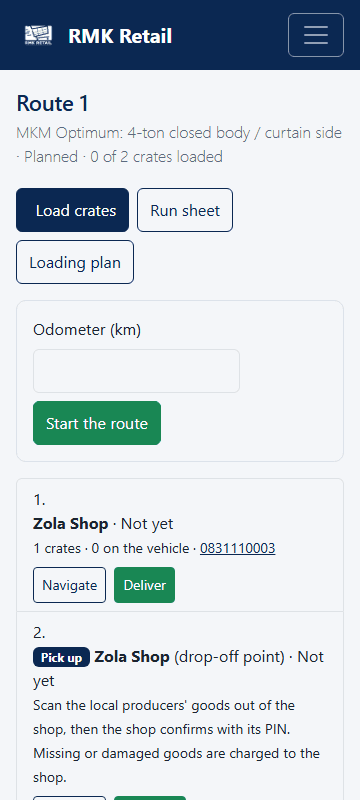
Some routes pick up goods before the shops: fresh vegetables at a drop-off point, or goods at a local supplier.
- At a drop-off point, tap the cyan Scan out button next to that stop.
- Scan or type each product's code, type the Weight (kg) or count, and tap the white Add button. Take the oldest sell-by date first.
-
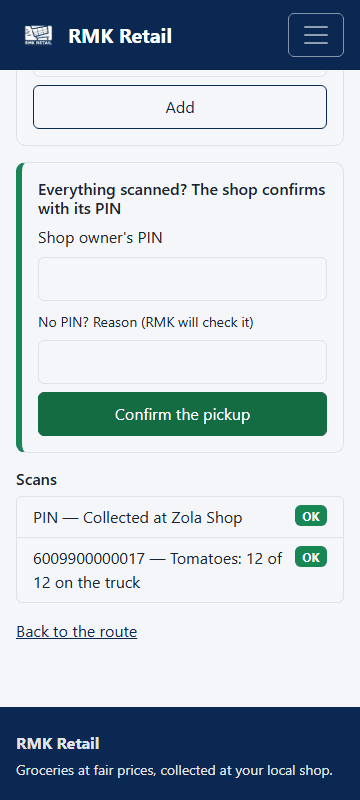
Tick Damaged or spoiled (charged to the shop) for bad produce.
-
The shop owner types the PIN. Tap the cyan Confirm the pickup button.
-
At a local supplier, tap the cyan Count, grade and collect button.
-
For each product, type what you take, what you refuse, the grade (A or B) and why.
-
The supplier types its PIN in Supplier's PIN. Tap Confirm the collection.
What you will see
The stop is done. Keep fresh produce in the shade with air, never under heavy boxes. It must reach the shops within 8 hours of pickup. Up to 2% less weight is normal for fresh produce. Refused goods stay with the supplier and are not paid.
If something goes wrong
- "The supplier's PIN is not right". Ask the supplier to type it again. A supplier who forgot it sets a new one.
- The shop at the drop-off point has no PIN. Type the reason and call RMK.
- You help pack at a wholesaler's loading bay. Scan a crate label, scan each item into it, then tap the cyan Close the crate button. One shop's order per crate.
Ask for help
WhatsApp 064 654 1357 · phone 015 296 4695 · e-mail connect@rmkretail.co.za · Monday to Friday 08:00–17:00, Saturday and Sunday 08:00–14:00.