Do this if you deliver to the shops yourself. If RMK collects at your place instead, the driver counts and grades the goods, and you type your Hand-over PIN on the driver's phone.
- Tap Orders in the black bar at the bottom of the screen.
-
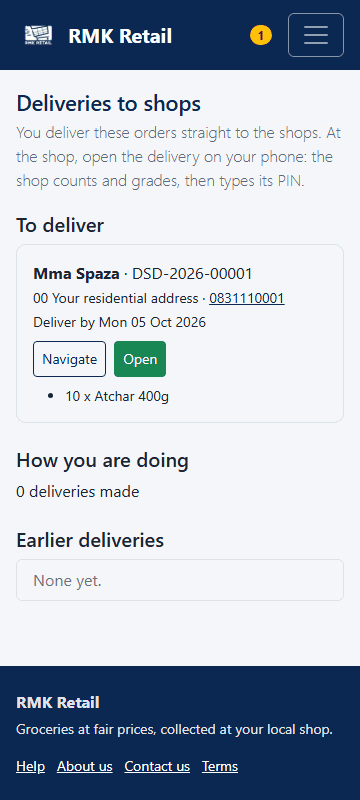
Look at Deliver by for each shop. Tap the white Navigate button for directions.
-
At the shop, tap the cyan Open button next to the delivery.
-
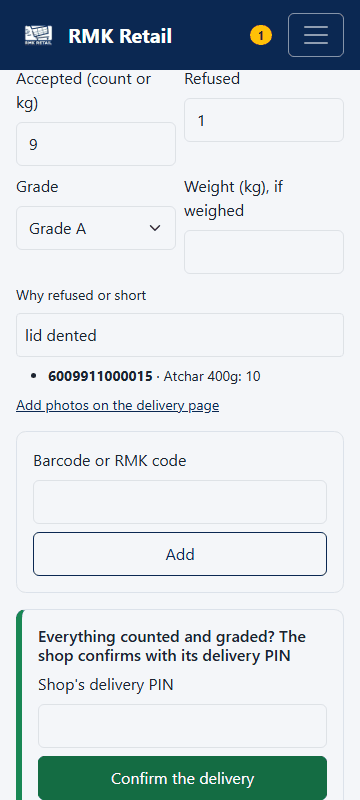
Tap the cyan Count with the shop and confirm button. The shop counts, grades and says what it refuses.
-
Add a photo of the goods and tap the white Upload button.
-
The shop types its PIN on your phone. Tap Confirm the delivery.
What you will see
The accepted goods go on your monthly statement. How you are doing shows how many deliveries were on time and how much of the order was accepted. The scanner works without signal and sends later.
If something goes wrong
- Goods were refused or short. They are not paid, and the shop does not pay for them. Short goods may come back to you as a new order, paid at your price when the shop first ordered (or your new price, if lower).
- "The shop's PIN is not right". Only the shop owner knows it. Ask them to type it again.
- You are late. RMK is told and may cancel the delivery and buy elsewhere. Ask RMK if you need more days.
Ask for help
WhatsApp 064 654 1357 · phone 015 296 4695 · e-mail connect@rmkretail.co.za · Monday to Friday 08:00–17:00, Saturday and Sunday 08:00–14:00.