Every customer order for your shop waits for you first. Do this every day.
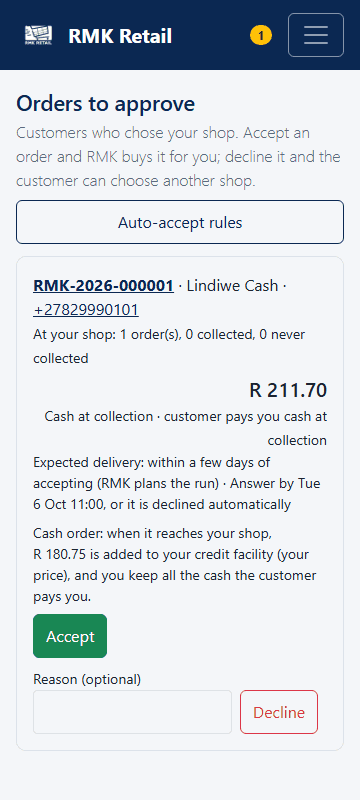
- Tap Orders in the black bar at the bottom, or Orders to approve on Shop home.
-
Look at the order: the customer, the goods, how they pay, and Answer by (the time to answer).
-
To take the order, tap the cyan Accept button.
-
If you cannot take it, type a reason and tap the red-bordered Decline button.
What you will see
When you accept, RMK buys and delivers the order. Customers who pay by EFT or PayFast pay only after you accept. An order you do not answer in 24 business hours is declined. When you decline, the customer can choose another shop.
Cash orders need a stock facility. When the goods reach your shop, the shop price is added to your facility. The customer pays you the full price in cash, and the difference is yours. Example for goods with a base price of R100: the customer pays you R136.50, you owe RMK R109.50 and keep R27.00. With a sales rep you owe R116.50 and keep R20.00. A cash order not collected in 14 days becomes your stock, and you still owe for it.
If something goes wrong
- You cannot accept a cash order You need a stock facility with enough money available. Decline it, or pay back some of what you owe first.
- An order is gone from the list It was answered by you or by a rule, or declined after 24 business hours.
- You want some orders accepted for you Tap the white Auto-accept rules button. You can accept EFT and PayFast orders, and cash orders from customers who collected 3 orders at your shop.
Ask for help
WhatsApp 064 654 1357 · phone 015 296 4695 · e-mail connect@rmkretail.co.za · Monday to Friday 08:00–17:00, Saturday and Sunday 08:00–14:00.